CI/CD integration
Outerbounds integrates seamlessly to CI/CD systems. Read this comprehensive blog post about the topic.
GitOps for Outerbounds
The following diagram illustrates a typical CI/CD pattern:
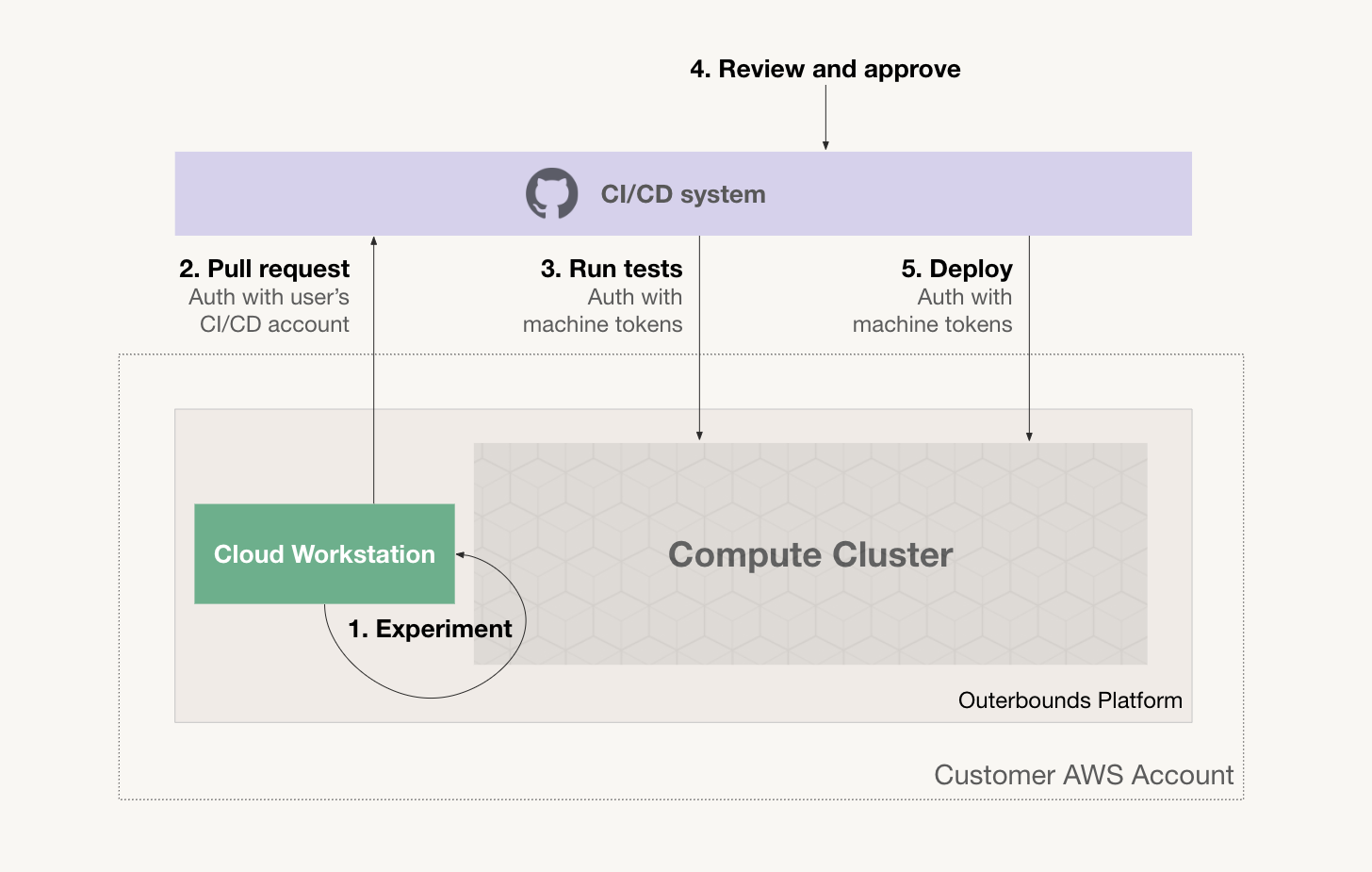
The user experiments and prototypes code on a cloud workstation or locally on a laptop. Crucially, the user is able to test their code at scale quickly and autonomously in to the Outerbounds cluster.
When the code seems to work adequately, they commit it and open a pull request. They authenticate with the CI/CD system using their personal credentials.
The CI/CD system, e.g. GitHub Actions, CircleCI can be configured to launch a test suite automatically when a pull request is opened. The CI/CD system submits workloads to Outerbounds authenticating as a machine user.
After tests pass, a human reviewer reviews the pull request. The reviewer may tag the pull request as approved and a corresponding Metaflow tag can be applied to tests as well, signalling a successful PR.
After the PR has been approved, the CI/CD system deploys the flow either as a new production version or as , running concurrently with the production version so its performance can be evaluated live.
Supported CI/CD Platforms
Outerbounds supports all major CI/CD platforms through OIDC-based authentication:
- GitHub Actions - Native OIDC support
- GitLab CI/CD - Native OIDC support via
id_tokens - Azure DevOps - Azure AD federation
- CircleCI - OIDC token support
Each platform uses a similar pattern:
- Configure a machine user in Outerbounds
- Set up OIDC authentication in your CI/CD config
- Use
obproject-deployto deploy your project
Using Outerbounds with GitHub Actions
This video and the accompaniying repository demonstrates the key workflows in practice:
Follow instructions in this repository to set up OBP work with GitHub Actions.
Example GitHub Actions workflow
name: Deploy Project
on:
  push:
    branches: [main]
  pull_request:
    branches: [main]

permissions:
  id-token: write
  contents: read

jobs:
  deploy:
    runs-on: ubuntu-latest
    steps:
    - uses: actions/checkout@v4
      with:
        fetch-depth: 0

    - name: Set up Python
      uses: actions/setup-python@v5
      with:
        python-version: "3.12"

    - name: Install dependencies
      run: pip install outerbounds ob-project-utils pyyaml

    - name: Configure Outerbounds
      run: |
        PROJECT_NAME=$(yq .project obproject.toml)
        PLATFORM=$(yq .platform obproject.toml)
        CICD_USER="${PROJECT_NAME//_/-}-cicd"
        outerbounds service-principal-configure \
          --name $CICD_USER \
          --deployment-domain $PLATFORM \
          --perimeter default \
          --github-actions

    - name: Deploy Project
      run: obproject-deploy
Using Outerbounds with GitLab CI/CD
GitLab CI/CD supports OIDC authentication via the id_tokens keyword. See the GitLab CI template for a ready-to-use configuration.
The aud value in id_tokens must match your Outerbounds platform URL (e.g., https://my-company.outerbounds.com). This cannot be dynamically read from obproject.toml because GitLab evaluates id_tokens at pipeline creation time, before any scripts run. Update this value when setting up a new project.
Example .gitlab-ci.yml
stages:
  - deploy

deploy:
  stage: deploy
  image: python:3.12
  rules:
    - if: $CI_PIPELINE_SOURCE == "merge_request_event"
    - if: $CI_COMMIT_BRANCH == "main"

  id_tokens:
    OUTERBOUNDS_ID_TOKEN:
      aud: https://my-company.outerbounds.com  # Update to your platform URL

  script:
    - wget -qO /usr/local/bin/yq https://github.com/mikefarah/yq/releases/latest/download/yq_linux_amd64
    - chmod +x /usr/local/bin/yq
    - pip install outerbounds ob-project-utils pyyaml

    - PROJECT_NAME=$(yq .project obproject.toml)
    - PLATFORM=$(yq .platform obproject.toml)
    - CICD_USER="${PROJECT_NAME//_/-}-cicd"
    - |
      outerbounds service-principal-configure \
        --name $CICD_USER \
        --deployment-domain $PLATFORM \
        --perimeter default \
        --jwt-token $OUTERBOUNDS_ID_TOKEN

    - obproject-deploy

  artifacts:
    paths:
      - deployment_summary.md
    when: always
Using Outerbounds with Azure DevOps
Azure DevOps supports OIDC through Azure AD federation.
Example azure-pipelines.yml
trigger:
  - main

pr:
  - main

pool:
  vmImage: ubuntu-latest

steps:
- checkout: self

- task: AzureCLI@2
  displayName: 'Configure Outerbounds'
  inputs:
    azureSubscription: 'your-azure-connection'  # Replace with your service connection
    addSpnToEnvironment: true
    scriptType: bash
    scriptLocation: inlineScript
    inlineScript: |
      wget -qO /usr/local/bin/yq https://github.com/mikefarah/yq/releases/latest/download/yq_linux_amd64
      chmod +x /usr/local/bin/yq

      PROJECT_NAME=$(yq .project obproject.toml)
      PLATFORM=$(yq .platform obproject.toml)
      CICD_USER="${PROJECT_NAME//_/-}-cicd"

      pip install outerbounds ob-project-utils pyyaml
      outerbounds service-principal-configure \
        --name $CICD_USER \
        --deployment-domain $PLATFORM \
        --perimeter default \
        --jwt-token $idToken

- script: obproject-deploy
  displayName: 'Deploy Project'
  env:
    SYSTEM_ACCESSTOKEN: $(System.AccessToken)
Using Outerbounds with CircleCI
CircleCI supports OIDC tokens for secure authentication.
Example .circleci/config.yml
version: 2.1

jobs:
  deploy:
    docker:
      - image: cimg/python:3.12
    steps:
      - checkout
      - run:
          name: Install dependencies
          command: |
            wget -qO /usr/local/bin/yq https://github.com/mikefarah/yq/releases/latest/download/yq_linux_amd64
            chmod +x /usr/local/bin/yq
            pip install outerbounds ob-project-utils pyyaml
      - run:
          name: Configure Outerbounds
          command: |
            PROJECT_NAME=$(yq .project obproject.toml)
            PLATFORM=$(yq .platform obproject.toml)
            CICD_USER="${PROJECT_NAME//_/-}-cicd"
            outerbounds service-principal-configure \
              --name $CICD_USER \
              --deployment-domain $PLATFORM \
              --perimeter default \
              --jwt-token $CIRCLE_OIDC_TOKEN_V2
      - run:
          name: Deploy Project
          command: obproject-deploy

workflows:
  deploy:
    jobs:
      - deploy:
          context: [OIDC_CONTEXT]  # CircleCI context with OIDC enabled
          filters:
            branches:
              only: [main]
Don't hesitate to contact support on Slack if you need help setting up GitOps effectively in your environment.