Project assets
Assets are a new feature in Outerbounds. Don't hesitate to contact your support Slack with feedback and questions!
Metaflow artifacts are a core building block for managing data and models. Outerbounds Projects extends this concept with data assets and model assets, which complement artifacts by adding an extra layer of metadata, tracking, and observability, and unifying the concept of Metaflow branching with typical VCS branches developers are used to.
What are assets
Consider assets as the core interfaces of your projects - your key inputs, outputs, and pluggable components. Unlike code, which is versioned through systems like Git and rolled out with CI/CD, assets often evolve automatically. For example, data assets can refresh continuously via ETL pipelines, while models can be retrained and finetuned on a regular cadence through automated training workflows.
The asset tracking in Outerbounds helps answer three key questions:
What are the core assets consumed and produced by the project?
Which project components - flows and deployments - are responsible for producing and consuming each asset?
When was the asset last refreshed, and what are the key metrics for its latest version?
These questions apply equally to models and data. The questions are also relevant both for traditional ML and bleeding-edge AI projects.
In the latter case, you may not retrain models continuously (though ongoing fine-tuning is certainly possible) but you are likely to experiment with different LLMs and upgrade them periodically. Crucially, assets are scoped to a project branch, allowing you to evaluate models and datasets in isolation across branches and compare their performance.
Defining an asset
Every asset is defined through a configuration file, asset_config.toml, placed
in a subdirectory under model and data in your project
structure.
For instance, you could define a fraud detection model, trained with financial
transaction data, and a churn model trained with product_events as follows:
models/fraud/asset_config.toml
models/churn/asset_config.toml

data/transactions/asset_config.toml
data/product_events/asset_config.toml
If models/ or data/ conflicts with existing folders in your project, you can customize these names via [obproject_dirs] in obproject.toml. See Project structure for details.
A configuration field has a few mandatory fields, as shown by the XKCD project example:
name = "Latest XKCD comic"
id = 'xkcd'
description = "Latest xkcd comic strip image"

[properties]
key = "value"
test = "another"
nameis a human-readable name of the asset.idis an unambiguous ID used to refer to the asset.descriptionis shown in the UI.The resulting asset listing will look like this:
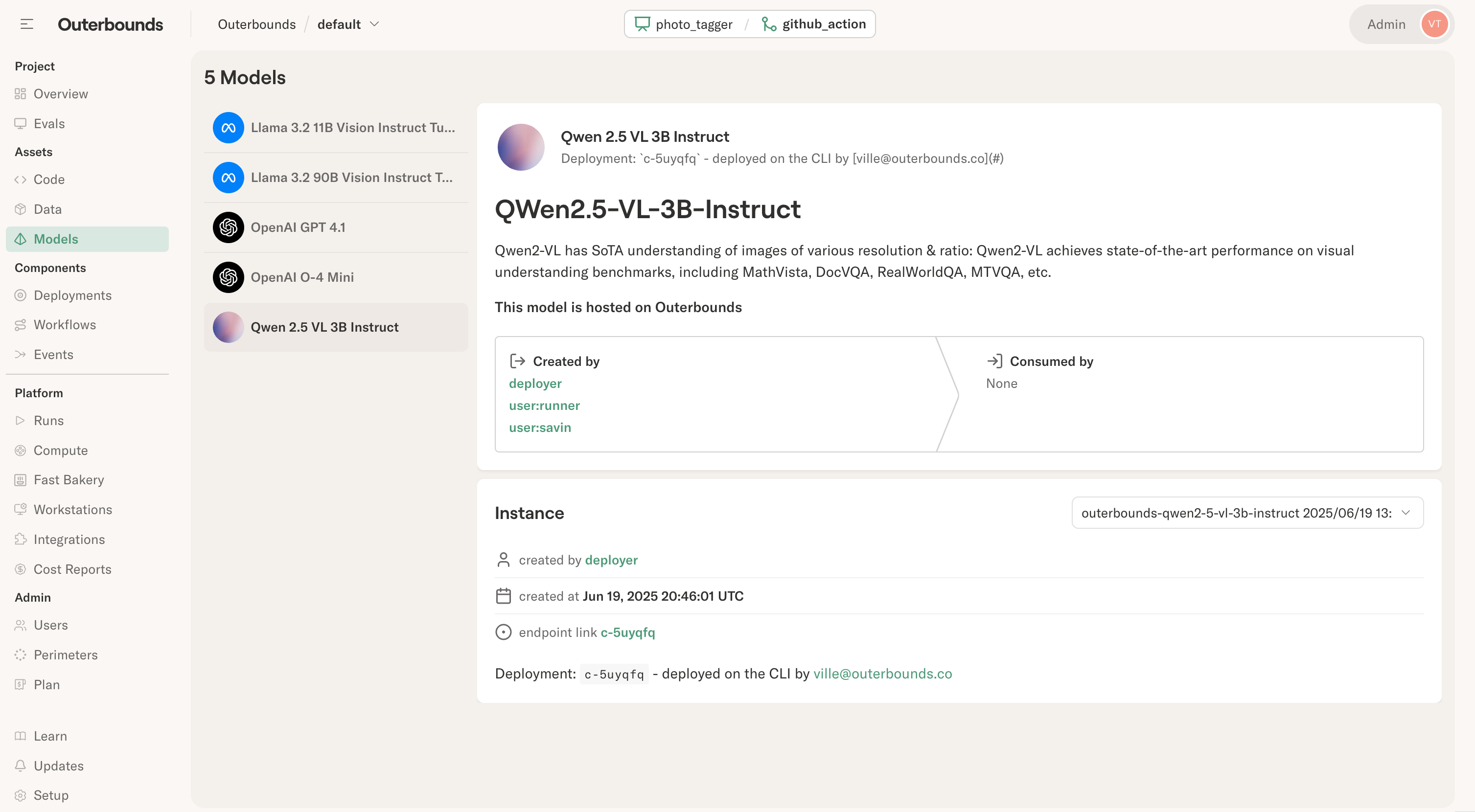
Optionally, you may assign arbitrary key-value pairs in the asset
under [properties]. This can be handy e.g. when working with models
(LLMs) accessed through external inference providers, each of which
has their own ID for the model:
name = "Small LLama"
id = "small_llama"
description = "A small LLM, currently llama3.1 8B"

[properties]
bedrock = "us.meta.llama3-1-8b-instruct-v1:0"
nebius =  "meta-llama/Meta-Llama-3.1-8B-Instruct-fast"
togetherai = "meta-llama/Meta-Llama-3.1-8B-Instruct-Turbo"
outerbounds = "meta-llama/Llama-3.1-8B-Instruct"
You can access the properties programmatically through the Assets API. Asset definitions are updated automatically every time you push an update to the project through CI/CD.
Updating an asset instance
Think asset definitions as containers for asset instances. Every time an asset updates, a new, versioned asset instance is created. It is possible to have asset with no instances - just metadata - like references to external models as shown above, but in most cases you want to populate an asset programmatically.
Assets are typically updated in a flow, for instance, in an ETL
workflow or a model retraining pipeline. The easiest way is to
register an artifact, like img_url below, as an asset - as shown
in this snippet from
XKCDData:
self.latest_id, self.img_url = fetch_latest()
self.prj.register_data("xkcd", "img_url")
Assets are not used to store the data or model itself. Rather, they store a reference to the actual entity, such as a data artifact or an external model endpoint.
In ob-project-starter, the latest comic strip is a core entity
being processed, so it makes sense to elevate the corresponding artifact
as an asset. This allows you to observe the asset conveniently in the
asset view:
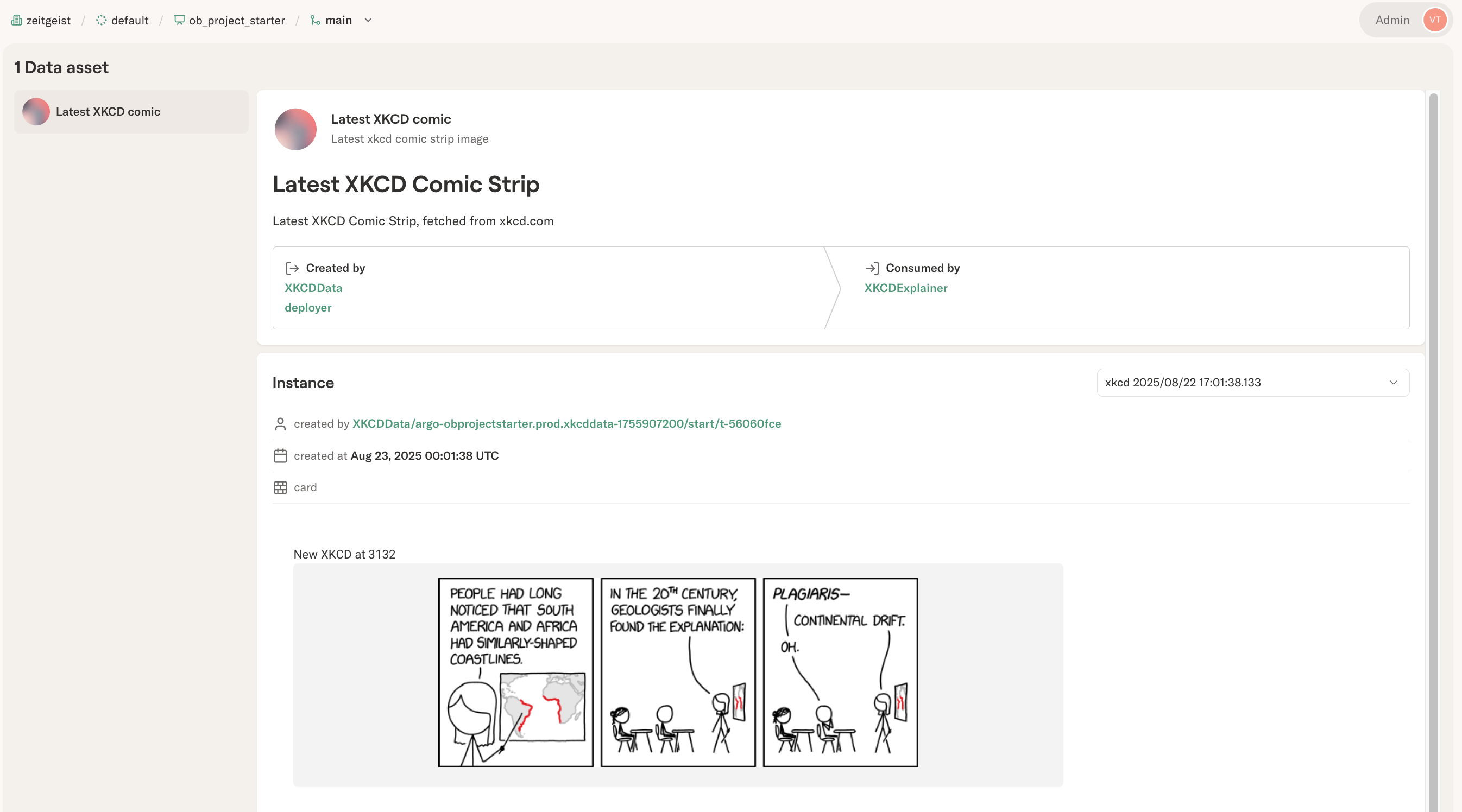
The visualization shown in the asset view is a normal Metaflow
@card,
produced by the task registering an asset instance with register_data.
Customize the card to show metrics that matter for the asset instance,
for instance, data or model quality metrics.
Importantly, the asset UI contains a pointer to the exact task that
produced each asset instance (by calling register_data), allowing
you to track data lineage from producers to consumers.
Asset metadata: properties, annotations, and tags
Assets support three types of metadata, each serving a different purpose:
| Concept | Where Defined | When Set | Purpose |
|---|---|---|---|
properties | asset_config.toml | Deploy time (static) | Metadata about the asset definition itself |
annotations | register_data() | Runtime (per instance) | Instance-specific metadata like row counts, timestamps |
tags | register_data() | Runtime (per instance) | Filtering and categorization |
Properties are defined in asset_config.toml and are static - they describe the asset definition and don't change between instances. Use them for things like model provider IDs or data source descriptions.
Annotations are passed when registering an asset instance and are dynamic - they can vary with each instance. Use them for metrics like accuracy scores, row counts, or processing timestamps:
self.features = compute_features(data)
self.prj.register_data("fraud_features", "features",
    annotations={"row_count": str(len(self.features)), "schema_version": "v2"})
Tags are also passed at registration time and are used for filtering and categorization:
self.prj.register_data("fraud_features", "features",
    tags={"environment": "production", "source": "postgres"})
Consuming assets
Using an asset is straightforward. In a task, call get_data for data assets or get_model for model assets:
# Retrieve data asset
self.img_url = self.prj.get_data("xkcd")

# Retrieve model asset
self.model = self.prj.get_model("fraud_classifier")
As shown in the XKCDExplainer workflow,
get_data fetches the latest instance of an asset and automatically resolves the reference to the corresponding data item.
Similarly, get_model fetches the model artifact.
Importantly, both methods register the task as a consumer of the asset, contributing to data lineage tracking.
get_data() and get_model() work for artifact-based assets registered with register_data() and register_model().
For external assets (S3 paths, checkpoints, HuggingFace models), use the low-level prj.asset.consume_data_asset() or prj.asset.consume_model_asset() methods, which return a reference containing the blobs list you can load manually.
Asset branch resolution
TL;DR: Deployed flows use git branches for assets. Local runs use Metaflow branches (user namespaces). Use [dev-assets] to read production data while developing.
Assets are scoped to branches, with different resolution depending on context:
- Deployed flows (via CI/CD): Use git branches, providing a 1:1 mapping between your code branch and asset branch
- Local runs (
python flow.py run): Use Metaflow branches (e.g.,user.alice), providing user isolation
| Deployment Context | Git Branch | Asset Branch | Description |
|---|---|---|---|
Deployed from main | main | main | Production assets |
Deployed from feature/new-model | feature/new-model | feature/new-model | Feature branch assets |
| Local run | any | user.alice | User namespace isolation |
How branch resolution works:
| Context | Write Branch | Read Branch | Source |
|---|---|---|---|
| Deployed from main | main | main | Git branch from project_spec at deploy time |
| Deployed from feature-x | feature-x | feature-x | Git branch from project_spec at deploy time |
Deployed + [dev-assets] | feature-x | main | Write from project_spec, read from config |
| Local run | user.<name> | Same or configured | Metaflow branch for user isolation |
Local + [dev-assets] | user.<name> | main | Write to user branch, read from main |
The key pattern is code promotion with data stability: as code moves from feature branch to main via CI/CD, assets are automatically scoped to the deployed branch.
[dev-assets] lets you read from a different branch during development. This is useful when developing features that need access to production data:
| Context | Write Branch | Read Branch | Use Case |
|---|---|---|---|
| Deployed from main | main | main | Self-contained production assets |
| Deployed from feature-x | feature-x | feature-x | Isolated testing with own assets |
Deployed feature + [dev-assets] | feature-x | main | Test new code against production data |
| Local run | user.<name> | user.<name> | Isolated local development |
Local + [dev-assets] | user.<name> | main | Develop against production assets |
The [dev-assets] configuration in obproject.toml enables this pattern:
project = "my_project"

[dev-assets]
branch = "main"  # Read assets from the main branch
This allows you to:
- Develop locally against production assets without affecting them
- Deploy feature branches that validate new code against real data
- Iterate safely before merging changes to main
Local runs use Metaflow's @project branch (e.g., user.alice) for asset isolation, ensuring local experiments don't interfere with deployed flows. Deployed flows use git branches, captured at deploy time via obproject-deploy.
Next Steps
- Project utilities API - Complete API reference for
prjmethods - model-registry-project - Full example with champion/challenger patterns, versioning, and quality gates